


SongAI - AI Music Generator
4.6268.00 Reviews
App Specs
- Version
- 1.2.0
- Updated On
- License
- Free
- Downloads
- 50,000+
- Developer
- StudioLLC
- Categories
- Music & Audio
- Platform
- Android
Screenshots

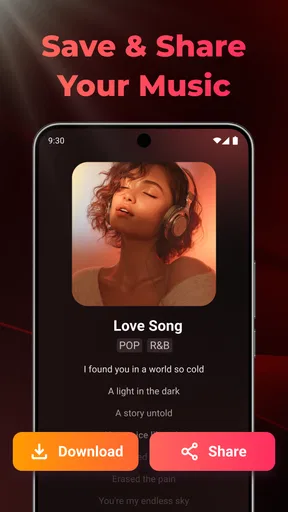
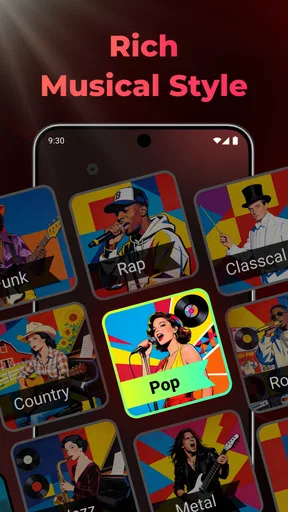
 Analysis by AppCompare
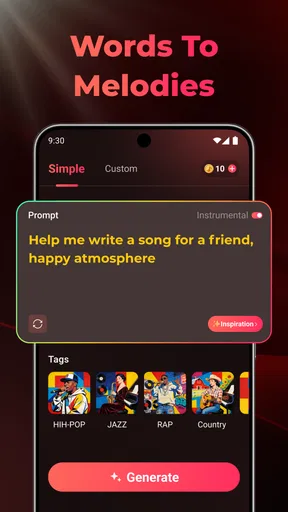
I approached SongAI as a quick creative tool rather than a replacement for a full music studio. It is a free Music & Audio app from StudioLLC that turns a written idea into an AI-assisted song using vocals, beats, and lyrics. That basic promise sounds simple, but its real value depends on how clearly you can describe the mood, subject, and structure you want. In my experience, the app is most enjoyable when I treat it as a sketchbook for musical ideas, not as a button that reliably produces a finished release.
The current version is 1.1.9, and the app has already attracted over 50 thousand installs. Its average score sits at 4.6 from around 900 ratings, with more than 200 written reviews, which suggests that many users find the central idea appealing. I can understand that reaction: SongAI removes much of the intimidating setup associated with music-making. You do not need to begin with a blank timeline, choose a virtual instrument, or understand mixing before hearing a result.
How SongAI feels in everyday use
When I think about using SongAI around other people, I see it as a shared source of ideas rather than a shared music library: one person can suggest a theme, while another helps describe the mood or lyrics. That makes casual collaboration easy to imagine, but I’d keep the creative brief focused so the result reflects a clear idea instead of a pile of competing requests. With that in mind, the next question is how I’d set boundaries before handing the device over.
A simple starting point for an unfinished idea
The strongest part of the experience is the short distance between an idea and an audible draft. I can imagine opening the app with only a theme in mind, describing something such as a late-night drive, a birthday message, or a reflective song about starting over, and using the generated result to discover a direction. That is different from traditional music apps, where the first task is often arranging tools rather than expressing an idea.
This makes the app particularly suitable for people who enjoy writing but do not know how to build a complete song. It can also help someone who has a chorus line in their notes and wants to hear what kind of atmosphere might surround it. The output is useful as a prompt for further creativity, even when it is not exactly what I imagined on the first attempt.
I would not approach it expecting the same control as a digital audio workstation. A conventional studio app is better when I need to place every drum hit, edit individual vocal phrases, choose exact instruments, or preserve a carefully planned arrangement. SongAI is designed around speed and interpretation. That trade-off is the heart of the product: less technical work up front, but less certainty over the precise musical details.
A realistic everyday scenario
One practical use is preparing a personal song for a small occasion. Imagine that I want to make a playful track for a friend’s birthday during a lunch break. I could write down a few personal themes, decide whether the mood should be warm or humorous, and use the generated song as a memorable surprise. The result would not need to compete with a professionally recorded track; its value would come from turning a private message into something musical without requiring a singer, producer, or instrumentalist.
Worth Reading Before You Choose

Switching to Android Auto Means Rethinking Your Driving Routine

Google Calendar Makes a Crowded Week Easier to Manage

Baby Panda World Brings Quick Play to Modern Phones, but Its Game Library Feels Busy

ESPN’s Live Game View Makes Following Close Games Easier

QuizzLand Review: A Good Fit for Short Trivia Breaks, Not Every Player

Basketball Stars: Multiplayer Is Fast, but Can It Recover When Matches Go Wrong?
Another useful workflow is songwriting practice. I can start with a broad concept, listen to the generated version, and then notice which parts feel emotionally right and which parts feel generic. That gives me something concrete to react to. Instead of asking myself whether an idea works in theory, I can judge its rhythm, tone, and lyrical direction by hearing an interpretation of it.
There is also a place for quick background concepts. A video creator, student, or hobbyist may need a musical starting point for a personal project and may prefer experimenting with a generated draft before learning a more complex tool. In that situation, the app can save time during the exploration stage, especially when the goal is to compare several moods rather than polish one arrangement immediately.
How I get more useful results
The biggest practical lesson is to write prompts with enough direction to narrow the result without turning them into a confusing paragraph. I get more value from describing the emotional tone, subject, pacing, and vocal character than from using only a genre label. “A hopeful song about returning home after a difficult year” gives the system more creative context than a vague request for a good song.
I also recommend separating the creative decisions. First, I decide what the song should be about. Then I choose the emotional direction. Only after that do I think about whether the beat should feel relaxed, energetic, dramatic, or intimate. This prevents the request from becoming a list of unrelated ideas and makes it easier to understand why a result feels wrong.
A less obvious benefit is that unsuccessful generations can still be informative. If the lyrics are too broad, I can make the theme more specific. If the mood feels too cheerful, I can describe the emotional contrast more clearly. If the song sounds unlike the imagined scene, that tells me the original idea needs better wording. In this way, the app can teach prompt discipline through trial and comparison, even though it is not presented as a songwriting course.
For anyone hoping to keep a consistent creative identity, I would save the wording of prompts that produce useful results. Reusing the same descriptive language can make experiments easier to compare. It does not guarantee identical outcomes, but it gives me a clearer record of what I asked for and helps distinguish a problem with the concept from a problem with the generation itself.
Where the AI approach helps and where it gets in the way
AI generation is helpful when the main obstacle is getting started. It can provide a rough arrangement or lyrical direction before I have invested much time. That makes it more approachable than a traditional music workstation for casual users. Someone who feels blocked by technical controls can focus on the feeling and message first.
The same automation can become frustrating when I have a very exact musical target. If I already know the melody, vocal phrasing, or arrangement I want, an AI generator may feel too indirect. I would rather use a conventional editor in that situation because direct control matters more than instant inspiration.
There is another creative trade-off. A generated song may sound coherent while still feeling less personal than something built from my own performance. That does not make it useless, but it changes how I judge it. I see the output as a draft, concept, or playful finished item for an informal setting. For a deeply personal recording, I would want tools that let me shape every vocal and instrumental decision myself.
What the current release means for users
The move to version 1.1.9 gives the app a clear current reference point for anyone deciding whether to try it now. I would treat this release as the version to evaluate rather than relying on impressions from an earlier stage of the product. For a young creative app, that distinction matters because small changes can affect how smoothly the main generation workflow feels.
Its release date, August 4, 2025, also places it in an early phase of its development. I see that as both an opportunity and a reason to keep expectations measured. A newer app can feel focused because it concentrates on one appealing idea, but it may not yet offer the depth, fine editing, or mature workflow of long-established music software.
For people who already use the app, the most important effect of a current version is not simply the number attached to it. It is whether the central process remains quick and understandable. If I can move from an idea to a listenable draft without fighting the interface, the app is doing its main job. If I need to repeat the same generation many times to get close to the intended mood, the convenience becomes less impressive.
Cost, access, and the point where expectations change
SongAI is free to install and has an Everyone content rating, so it is easy to consider for casual experimentation. That makes sense for an app intended to invite people into AI-assisted music creation rather than target only experienced producers. The free entry point is especially useful if I want to test whether this style of songwriting suits me before committing to a more serious music subscription or desktop setup.
There are in-app purchases ranging from $4.99 to $129.99 per item. That is the point where I would slow down and decide how often I expect to use the app. A free download can be excellent for occasional ideas, but frequent creators should understand what they are comfortable spending before treating it as a regular production tool. I would try the basic experience first and avoid paying simply because one generation happens to be disappointing.
The pricing structure also changes the comparison with ordinary music apps. A traditional editor may require more learning but give me predictable control over the work I create. SongAI offers a faster creative path, yet the value depends on how much I appreciate automated experimentation. If I mainly want to trim recordings, layer my own loops, or edit an existing performance, another type of app may be a better match.
Who should try it, and who should skip it
I would recommend SongAI to curious beginners, lyric writers, casual creators, and anyone who enjoys turning unusual ideas into quick musical sketches. It is also a good fit for people who want a playful way to make a themed song without learning music production first. The app is most rewarding when the goal is discovery: finding a mood, testing a concept, or making something personal for a relaxed occasion.
I would be more cautious about recommending it to musicians who need detailed control over arrangement, recording, mixing, or vocal editing. If the purpose is to produce a polished track with a carefully managed performance, a full studio application will usually be more appropriate. The same applies to users who dislike unpredictable creative results. AI tools can be exciting precisely because they interpret an idea, but that interpretation can also move away from the sound I had in mind.
It is also not the ideal choice if I only need a conventional audio player, a library manager, or a tool for editing recordings I already own. Its appeal comes from generation, not from replacing every part of the broader Music & Audio category.
Remaining gaps in the creative workflow
The main limitation is the distance between a generated song and a truly finished production. Hearing a complete-sounding result can create the impression that the work is done, but I still need to judge whether the lyrics are specific enough, whether the mood fits the intended audience, and whether the song has a memorable identity. The app can accelerate the first draft; it does not remove the need for taste and revision.
Another friction point is consistency. When I am developing a song idea, I want changes to improve one part without losing another. AI generation can make that process less predictable than editing a fixed arrangement. A new attempt may fix the lyrics but alter the atmosphere, or produce a stronger beat while weakening the emotional message. That is manageable for brainstorming, but tiring when I am trying to refine one precise concept.
There is also a practical reason to keep personal expectations realistic: a short description cannot communicate every subtle detail of a song. The more specific my mental target, the more likely I am to notice differences between what I imagined and what the app creates. Users who enjoy happy accidents will probably find that exciting. Users who want faithful execution may see it as a drawback.
What I would watch as the app develops
Because the product is still relatively young, I would watch how StudioLLC expands the space between generation and editing. The most meaningful progress would be anything that lets users preserve a promising idea while making focused changes to lyrics, vocals, beats, or structure. That would reduce the need to start over whenever one element is almost right.
I would also pay attention to how clearly the app communicates the relationship between the free experience and its in-app purchases. A creative tool feels better when I understand the limits before investing time in a project. Clear expectations matter especially for beginners, who may not know which parts of a music workflow they will eventually need.
For existing users, the best way to judge future updates is to ask whether they improve creative control without making the app feel complicated. SongAI succeeds when it keeps the first step friendly. Adding depth is valuable, but not if the interface loses the quick, idea-first character that makes the app appealing in the first place.
My final take after using it
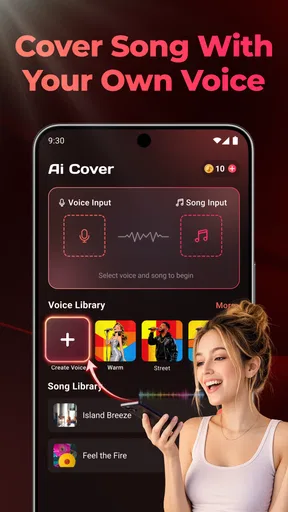
SongAI - AI Music Generator is a friendly entry point into AI-assisted songwriting. I like it most as a place to turn a vague musical thought into something I can hear, question, and reshape. Its combination of generated voice, beat, and lyrics makes the first stage of creation feel accessible, while the free installation lowers the risk of trying the concept for yourself.
My recommendation comes with a clear condition: use it as a creative launchpad, not as a substitute for complete production control. If you want fast experiments, personal surprises, or a way to overcome a blank page, it is worth exploring. If you need exact arrangement decisions, dependable revision, and hands-on audio editing, choose a traditional music-making tool instead.
For me, the app’s lasting value is not whether every generated song is perfect. It is whether one result gives me a direction I would not have found alone. When that happens, the app earns its place on my device. When I need precision rather than possibility, I know it is time to move the idea into a more controllable studio workflow.
Pros
- Generates original tracks from simple text prompts
- Offers multiple genres and moods for creative experimentation
- Useful for quickly creating ideas
- demos
- or background music
- Saves time compared with composing every element manually
- Accessible interface suitable for users without music training
Cons
- Generated songs may sound repetitive or lack emotional depth
- Results can vary significantly between similar prompts
- Some features or exports may require a paid subscription
- Commercial usage rights may depend on the selected plan
- Longer compositions may have limited structure or variation
FAQs for SongAI - AI Music Generator
What is SongAI - AI Music Generator and how does it work?
SongAI - AI Music Generator is an app designed to create original music with the help of artificial intelligence. After entering a prompt, describing a mood, choosing a genre, or selecting other available options, the app generates a musical track based on your instructions. Results can vary, so experimenting with different descriptions is often the best way to achieve a style you like.
Can SongAI create complete songs with vocals and lyrics?
SongAI may support more than simple instrumental generation, depending on the version, platform, and features available in your region. Some creations can include melodies, arrangements, lyrics, or AI-generated vocals, while others may focus mainly on instrumental music. Before downloading, check the current feature list because voice quality, song length, and customization options can change through updates.
Is SongAI - AI Music Generator free to use?
SongAI can generally be downloaded without an upfront payment, but free access may include limitations such as a restricted number of generations, slower processing, watermarked exports, advertisements, or reduced audio quality. Additional credits or premium tools may require a subscription or in-app purchase. Review the pricing information carefully before starting a trial, especially if automatic renewal is enabled.
Can I use songs created with SongAI commercially?
Commercial usage depends on SongAI’s current licensing terms and the type of account used to generate the music. A free plan may provide personal-use rights only, while a paid plan could offer broader permissions. You should read the app’s license agreement before publishing tracks on streaming platforms, using them in videos, or monetizing them, and avoid claiming ownership of material that may contain copyrighted elements.
What should I know about privacy and the prompts I submit to SongAI?
When using SongAI, prompts, uploaded material, account details, and generated tracks may be processed by the app’s servers to create and manage your music. Avoid submitting private information, unreleased commercial content, or copyrighted files unless you understand how they are handled. Check the privacy policy for information about data retention, third-party services, account deletion, and whether your prompts may be used to improve the service.


